Best Web Hosting

ChemiCloud Review – The Speedy, Support-Heavy Host You Might Just Love

 A Speedy Introduction

Choosing the right web host can feel like navigating a labyrinth—performance, reliability, cost, support—it’s a lot. Enter ChemiCloud, a web hosting provider that’s been gaining traction for its speed, support, and solid value. Founded in 2016, it offers a variety of hosting solutions—from shared and WordPress to VPS and reseller options—dressed with attractive promos like free domain, migrations, and up to 78% off shared plans.


 Performance & Technology: Fast, LiteSpeed-Powered Sites

 LiteSpeed Servers + Caching = Fast Loading

ChemiCloud builds its foundation on LiteSpeed servers and includes the LiteSpeed Cache plugin by default—a combination that delivers snappy page loads and smooth caching. Hostingstep’s 2025 testing confirms strong Time-to-First-Byte (TTFB), especially for North American visitors, although global performance lags somewhat.

 Hardware That Delivers

According to a July 2025 deep dive, ChemiCloud utilizes 3.8 GHz AMD EPYC 9354 CPUs paired with PCIe 4.0 NVMe SSDs, offering significantly faster read/write speeds than older SATA drives. You can even upgrade to Turbo+ for twice the CPU and RAM.

 Handling Traffic and Load

However, performance under pressure isn’t flawless—cheaper plans may struggle during spikes or heavy load, and Hostingstep’s tests flagged poor load times and subpar WPBench scores. A Reddit user highlights that “errors during traffic spikes” are rare but possible due to resource limits like Entry Processes.


 Pricing & Plans: Sweet Deals, Smart Considerations

 Attractive Intro Prices, Free Perks

Promotional pricing can be compelling—starter plans begin as low as $3.95/month and include freebies like domain registration, free migrations, and a generous 45-day money-back guarantee.

 But Be Wary at Renewal Time

Renewal fees do climb. For instance, starter plans may renew at ~$9.95/month, pro plans at ~$14.95, and Turbo at ~$19.95. Longer-term commitments (e.g., 36 months) help soften the blow but still result in higher costs than the initial discount.


 Support & Migrations: A Stand-Out Strength

 Customer Service That Truly Stands Out

ChemiCloud consistently earns praise for its support. According to multiple G2 reviewers:

“Super fast (almost instant) support from VERY competent techs.”
“I have never had support service like this.”

Trustpilot echoes this sentiment with a strong 4.7 score and frequent mentions of “seamless migrations,” helpful staff, and fast resolution times.

 Migration That Actually Works

Multiple sources and customer testimonials praise ChemiCloud’s free, smooth migration process. One user shared how moving nearly 40 sites went flawlessly, in just a few hours.


 Reliability & Uptime: Mostly Solid, With Some Caveats

 Promised 99.99% Uptime—and Often Achieved

ChemiCloud advertises 99.99% uptime, and many users report great stability. Hostingstep’s data from 2024–25 shows an average uptime of ~99.92%, improving to ~99.98% in early 2025.

 Minor Issues Shouldn’t Be Ignored

Despite overall reliability, no host is perfect. A few Trustpilot users mentioned downtime or slower issue resolution, though these appear to be the exception rather than the rule.


Usability & Features: Powerful, If Slightly Traditional

 Familiar and Powerful Interface

ChemiCloud uses cPanel, enhanced with their custom dashboard. While familiar to experienced users, some beginners might find cPanel a bit intimidating.

 Daily Backups & PHP Control

Daily backups come included across plans, providing peace of mind for users testing new changes. Plus, you can select specific PHP versions to suit your applications—great for developers managing multiple environments.

 Global Server Locations

Having multiple server locations worldwide allows users to choose the closest data center—an effective way to improve site speed for international audiences.


 Who Should (and Shouldn’t) Choose ChemiCloud

 Ideal For:

  • Personal bloggers, small businesses, and growing websites with moderate traffic.

  • North American audiences, who benefit from faster TTFB.

  • Anyone who values top-notch support, reliable migrations, and a strong money-back guarantee.

  • Budget-conscious users open to long-term billing to maximize introductory pricing.

 Less Ideal For:

  • Sites that experience high traffic volume or frequent spikes—they might hit resource limits.

  • E-commerce stores or resource-heavy portals requiring consistently high performance.

  • Global audiences farther from data centers, unless a CDN is used.

  • Those seeking ultra-low renewal pricing—they may find the renewals less competitive.


 Final Verdict

H3 – Summary at a Glance

Attribute Strengths Areas to Watch
Performance LiteSpeed + caching, fast hardware, great for small/medium sites Load spikes, global latency, lower WPBench scores
Pricing Attractive introductory deals, free domain & migration, 45-day guarantee Significant renewal increase unless long-term plan is chosen
Support & Migrations Excellent 24/7 support, fast and knowledgeable team, seamless migrations
Reliability Promised 99.99% uptime, strong real-world performance Some downtime complaints, minor reliability exceptions
Usability & Features cPanel familiarity, daily backups, PHP choices, global servers cPanel learning curve for newbies

 Conclusion

With its solid performance, standout support, and user-friendly extras, ChemiCloud is a smart choice for bloggers, small businesses, and site owners who prioritize ease and reliability. If your site isn’t under heavy load and you don’t mind committing to longer billing cycles, it offers excellent value.

However, if your site is resource-intensive, traffic-heavy, or global in reach, you might consider hosts with stronger load handling or use a CDN strategically. Still, for many users, ChemiCloud offers a compelling blend of speed, service, and simplicity.

                Get The Link

SentryPC Reseller Program & Monitoring Software Review:

SentryPC Reseller Program & Monitoring Software Review:

1.SentryPC Reseller Program & Monitoring Software Review: 

SentryPC Reseller Program & Monitoring Software Review:

SentryPC is monitoring software developed by Spytech Software (founded 1998; rebranded 2005)  . Designed primarily for employee oversight, parental control, and school environments, it works stealthily on Windows and macOS systems to log activity, block content, enforce schedules, and capture screenshots and keystrokes.


2. The Reseller/Affiliate Program

Their reseller or affiliate program offers:

  • 40 % commission on every sale made via your custom link.

  • Free to join with real-time analytics and banner tools.

  • Monthly payouts (around the 15th) via check or direct deposit.

  • Cookie tracking—commission applies even if the user purchases later .

Pros: Generous commission, easy to sign up, marketing resources included.
Cons: You must create unique promotional content—copy-pasting their site is disallowed  .


3. Feature Overview

3.1 Core Features

  • Activity monitoring: Captures keystrokes, app/web usage, file events, clipboard, external drives  .

  • Screenshots: Taken at intervals or triggered by keywords—dual monitor supported.

  • Content filtering: Block or allow websites, apps, games, set block schedules  .

  • Time controls: Set daily/week usage limits or block by schedule  .

  • Remote/cloud access: Admin dashboard accessible via web, 2 FA, audit logs  .

  • Geofencing & device logging: IP & geolocation tracking (for remote monitoring) and USB/print/file logs .


3.2 Platform Support

  • Available: Windows & macOS desktops and Chromebooks to some extent.

  • Lacking: No mobile app monitoring for iOS/Android (beyond desktop login)  .


4. Pricing Structure

Pricing is tiered by license count and screenshot storage:

  • Basic: ~$60–70/year for a single PC; +$20–30 per additional PC .

  • Business tiers:

    • 50 devices: $1,495/year (~$30 each)

    • 100 devices: $2,495 (~$25 each)

    • 250 devices: $4,995 (~$20 each)

    • 500: $7,495 (~$15 each)

    • 1,000: $9,995 (~$10/ea) .

  • Screenshots caps per tier: from 500 on Basic to 2,000 on mid-to-high business plans .

  • Free trial: No free trial, but a demo dashboard is available .

  • No refunds: Licensed on an “as-is” basis. No refunds after purchase  .


5. Pros & Cons Overview

✅ Pros

  1. Comprehensive monitoring: Keystrokes, screenshots, website/app logs, file/USB activity, print jobs, and geofencing  

  2. Remote, cloud-based management: Access data from anywhere with 2‑step verification and audit logs  .

  3. Time & content control: Flexible scheduling and filtering per user/device  Scalable pricing: Per-device cost decreases significantly at higher tiers, full feature access even at base level  .

  4. Affiliate opportunity: 40 % commissions, solid promotional tools .

⚠️ Cons

  1. No mobile OS monitoring: iOS & Android are unsupported  .

  2. Data overload: Screenshots and logs can overwhelm admins (hundreds taken in hours)  .

  3. Customer support mixed:

    • Business.com praises support 

    • G2 includes complaints such as “The worst customer service” where support said, “I have to believe this problem is on your end”  .

    • Trustpilot/TopConsumerReviews suggest a mediocre 3.6–3.8/5 average  .

  4. Installation friction: Antivirus tools may flag it, requiring manual exclusions  .

  5. No refund, limited trial: Only a demo—not live software—must pay before committing  .


6. User Feedback

Third-party review sites:

  • Trustburn: 8 customer reviews, average 4.1/5, praising usability and support.

    “SentryPC is an indispensable tool for any employer… always available to assist…” —Yustyna Wilson
    “✅ I’ve tried several… none have been as effective as SentryPC.” —Tom Mundy

  • G2 (2 reviews):

    • One 1-star citing unreliability and dismissive support.

    • One 5-star calling it “Great for monitoring!” but notes transparency of monitoring may alert users  .

  • TopConsumerReviews: Mixed ratings (2–5 stars), no BBB profile, small review sample  .

Expert site reviews:

  • TechRadar (2019): “One of the best in its cohort,” but notes high cost, complex install, no mobile version and limited support .

  • Business.com (Feb 2025): 8.5/10, favorably priced, easy UI, good features; mild criticisms on mobile and trial availability .

  • WizCase (2020): Great features, but UI overwhelming, scheduling inflexible, desktop-only .

  • SkyBootstrap (Apr 2025): Recommends based on cybersecurity and productivity, but advises assessing compatibility .


7. Ideal Use Cases

  • Small to mid-size businesses needing remote oversight, schedule and data leak prevention—especially with Windows/macOS setups.

  • Parents of older children/teens wanting deep insight into computer behavior, provided they’re comfortable managing data volume.

  • Educational institutions seeking PC monitoring in labs (no mobile devices).

  • Resellers & affiliates aiming to earn through a 40 % commission model.

Less suitable for:

  • Users wanting mobile device monitoring.

  • Families seeking intuitive, mobile-inclusive parental control.

  • Those who need a free trial or refund options.

  • Non-technical admins who may be intimidated by initial AV configuration and data management.


8. Final Verdict

SentryPC is a powerful and feature-rich monitoring platform, best suited for desktops/Chromebooks. It delivers excellent value, especially at scale, with all features intact—even at lower tiers. Complex installation, data saturation, and mixed support experiences are drawbacks. Absence of mobile coverage and refund/trial limitations may deter some users.

For SentryPC Reseller Program & Monitoring Software Review

. However, you must produce original marketing content to avoid auto-disqualification.

Bottom line:

  • Good choice for Windows/macOS-focused businesses, tech-savvy parents wanting granular oversight, and affiliates looking for high commission deals.

  • ⚠️ Skip or proceed with caution if mobile support is crucial, you need robust trial/refund protection, or if non-technical users will manage the deployment.


Tips Before You Commit

  1. Test the demo—be sure the UI suits your needs.

  2. Check compatibility—especially with AV protections.

  3. Plan for data management—have workflows to sift logs & screenshots.

  4. Broach privacy concerns—be transparent with monitored users if required.

     SIGN UP FOR FREE HERE

Save Money: The Top 100 Tips & Smart Saving Strategies!

Save Money: The Top 100 Tips & Smart Saving Strategies!E-books

Save Money: The Top 100 Tips & Smart Saving Strategies!

Save Money: The Top 100 Tips & Smart Saving Strategies!E-books

         BUY NOW

In a world where every dollar counts, learning how to save money smartly can make a significant difference in your financial future. Whether you’re saving for a big purchase, building an emergency fund, or simply trying to stretch your income further, the key lies in consistency and creativity. Below, we dive into 100 money-saving tips and strategies, organized into practical categories, to help you make smarter financial decisions starting today.


Shopping & Spending Smart

  1. Create a shopping list—and stick to it.

  2. Never shop when you’re hungry.

  3. Use cashback and rebate apps like Rakuten or Ibotta.

  4. Compare prices online before buying anything.

  5. Wait 24 hours before making non-essential purchases.

  6. Buy store brands—they’re often made by name brands.

  7. Sign up for loyalty programs.

  8. Buy in bulk (only if you’ll use it).

  9. Use coupons—digital or paper.

  10. Shop post-holiday sales for next year.


At Home

  1. Turn off lights when not in use.

  2. Unplug electronics—phantom energy is real.

  3. Lower your thermostat by 1–2 degrees.

  4. Use a programmable thermostat.

  5. Fix leaky faucets—save on water bills.

  6. Cook at home instead of ordering out.

  7. Make coffee at home.

  8. Plan your meals for the week.

  9. Do laundry in cold water.

  10. Use LED bulbs.


Transportation

  1. Drive less—carpool or use public transit.

  2. Keep your tires inflated for better gas mileage.

  3. Use apps to find the cheapest gas near you.

  4. Walk or bike for short trips.

  5. Avoid speeding—wastes fuel.

  6. Combine errands to reduce trips.

  7. Keep up with car maintenance.

  8. Shop around for auto insurance.

  9. Consider downsizing to one car.

  10. Use a fuel rewards program.


Banking & Finances

  1. Set up automatic transfers to savings.

  2. Track every dollar you spend for a month.

  3. Avoid ATM fees—use in-network machines.

  4. Switch to a no-fee bank or credit union.

  5. Pay credit card bills in full.

  6. Use high-yield savings accounts.

  7. Negotiate fees—bank, credit cards, etc.

  8. Cancel unused subscriptions.

  9. Set financial goals—and review them monthly.

  10. Avoid impulse buying with a budget app.


At Work or Business

  1. Bring your lunch to work.

  2. Use your company’s benefits—401(k), gym, etc.

  3. Ask for remote work to save on commuting.

  4. Write off business expenses (if you’re eligible).

  5. Negotiate your salary or freelance rates.

  6. Attend free online workshops or webinars.

  7. Use open-source or free tools over paid software.

  8. Limit coffee runs and vending machine snacks.

  9. Borrow equipment or tools when possible.

  10. Track mileage and business-related expenses.


Debt & Credit Management

  1. Create a debt payoff plan (e.g., snowball method).

  2. Transfer high-interest debt to 0% APR cards.

  3. Refinance student loans if it lowers your rate.

  4. Avoid payday loans.

  5. Pay more than the minimum on credit cards.

  6. Check your credit report annually—free at AnnualCreditReport.com.

  7. Use credit responsibly—don’t max out cards.

  8. Avoid late fees—set reminders.

  9. Use a debt tracking spreadsheet.

  10. Celebrate small debt-payoff wins to stay motivated.


‍♂️ Lifestyle & Mindset

  1. Embrace minimalism—own less, spend less.

  2. Find free entertainment (parks, events, YouTube).

  3. Cancel cable—use cheaper streaming options.

  4. DIY where possible (home repairs, grooming).

  5. Exercise at home instead of the gym.

  6. Use the library for books and DVDs.

  7. Start a side hustle for extra income.

  8. Buy used when possible—apps like Facebook Marketplace help.

  9. Practice gratitude—it curbs unnecessary spending.

  10. Join local “Buy Nothing” groups.


Education & Family

  1. Use free online courses (Coursera, Khan Academy).

  2. Apply for scholarships and grants.

  3. Buy or rent used textbooks.

  4. Use a 529 savings plan for education.

  5. Pack kids’ lunches instead of buying school meals.

  6. Limit toy buying—opt for shared or secondhand.

  7. Teach children about budgeting early.

  8. Host playdates instead of pricey outings.

  9. Buy school supplies during tax-free weekends.

  10. Swap babysitting with trusted parents.


Subscriptions & Tech

  1. Audit your subscriptions quarterly.

  2. Use free trials wisely—and cancel before billing.

  3. Share family plans (Spotify, Netflix).

  4. Turn off auto-renewals.

  5. Use student or military discounts.

  6. Refurbished tech is cheaper and reliable.

  7. Avoid unnecessary upgrades.

  8. Use Wi-Fi instead of mobile data.

  9. Block in-app purchases on kids’ devices.

  10. Use open-source alternatives to paid apps.


Advanced Tips

  1. Automate your savings.

  2. Round up purchases into savings (via apps like Acorns).

  3. Buy quality—lasts longer, saves more.

  4. Invest in home insulation.

  5. Use a financial advisor if you’re unsure.

  6. Join a savings challenge (like $5 or 52-week).

  7. Buy off-season (e.g., winter coats in spring).

  8. Freeze your credit to avoid identity theft.

  9. Negotiate bills (phone, cable, internet).

  10. Be intentional—ask “Do I really need this?” before spending.

conclusion

Saving money doesn’t require drastic changes—it starts with small, intentional habits. By applying even 10 of these 100 smart saving strategies, you’ll be on your way to a healthier financial life. Review this list monthly, pick a few new ones to apply, and watch how quickly your savings can grow.

     BUY NOW

Mini Wireless Projector Review: A Compact Entertainment Powerhouse

Mini Wireless Projector Review: A Compact Entertainment Powerhouse

In today’s fast-paced digital world, having a mini wireless projector offers the ultimate in portable entertainment and productivity. Whether you’re a movie buff, a business professional, or a gamer on the go, this compact gadget delivers a cinematic experience in the palm of your hand. In this review, we’ll break down the key features, pros and cons, and help you decide if a mini wireless projector is worth the investment.

Mini Wireless Projector Review: A Compact Entertainment Powerhouse

       BUY NOW

What Is a Mini Wireless Projector?

A mini wireless projector is a compact, lightweight device that projects images, videos, or presentations onto a screen or flat surface. Unlike traditional bulky projectors, mini versions often fit in your pocket or bag and connect wirelessly to your smartphone, tablet, or laptop. Many models offer HDMI, USB, and Bluetooth compatibility, making them highly versatile for both home and travel use.


Key Features

  • Wireless connectivity via Wi-Fi, Bluetooth, or screen mirroring

  • HD or Full HD resolution for crisp visuals

  • Built-in speakers (some models support external audio)

  • Compact and lightweight design – often under 1 lb

  • Rechargeable battery with 1.5–3 hours of runtime

  • Multi-device compatibility – iOS, Android, Windows, macOS


Pros and Cons at a Glance

Here is a summarized table of the key advantages and drawbacks of using a mini wireless projector:

Pros Cons
Highly portable and easy to carry Lower brightness (100–300 lumens)
Wireless screen mirroring (AirPlay, Miracast, etc.) Sound output often limited; external speaker recommended
Great for various uses: movies, presentations, etc. Shorter battery life (1.5–3 hours)
Budget-friendly compared to larger projectors Reduced sharpness on large screen sizes
Operates on rechargeable battery—no constant outlet needed Limited built-in app support; may require streaming stick

Pros of Mini Wireless Projectors

1. Portability and Convenience

One of the biggest advantages is its size. You can easily carry a mini wireless projector in your backpack, making it ideal for business trips, outdoor movie nights, or classroom use. Setup is typically quick, with minimal cables or hardware required.

2. Wireless Functionality

Say goodbye to tangled cords. With wireless mirroring, you can stream content directly from your smartphone or tablet using technologies like AirPlay, Miracast, or Chromecast. This makes presentations and binge-watching much more seamless.

3. Versatile Use Cases

From projecting Netflix movies to displaying PowerPoint slides, mini wireless projectors are adaptable to different environments. They’re great for both entertainment and professional needs, and many models include built-in media players for USB drives or SD cards.

4. Affordable Price Point

Compared to high-end home theater projectors, mini wireless projectors are relatively affordable. Many quality models are available under $150, making them a budget-friendly solution for casual users.

5. Battery-Powered Flexibility

Most models come with a built-in rechargeable battery, allowing for wireless operation even in outdoor or power-limited settings. You don’t need to be near an outlet to enjoy a movie or give a presentation.


Cons of Mini Wireless Projectors

1. Lower Brightness Levels

Mini projectors typically offer 100–300 lumens, which is significantly lower than full-size models. This means they perform best in dark rooms or shaded outdoor areas. Daytime or well-lit room usage can result in a washed-out image.

2. Limited Sound Quality

While many models come with built-in speakers, the sound output is usually limited. For a true cinematic experience, connecting external speakers or headphones is often necessary.

3. Shorter Battery Life

Battery runtime can range between 1.5 to 3 hours depending on brightness settings and usage. For longer viewing sessions or presentations, you’ll likely need to plug in the device.

4. Reduced Image Quality on Larger Screens

While mini projectors often support HD resolution, image sharpness can decline as you increase the screen size. The sweet spot for clarity is usually between 30″ and 80″ screen sizes.

5. Limited App Support

Not all mini projectors come with native apps like Netflix or YouTube. Some may require screen casting or an external streaming stick (like Roku or Fire Stick) to access content.

Mini Wireless Projector Review: A Compact Entertainment Powerhouse

BUY NOW

Who Should Buy a Mini Wireless Projector?

This device is perfect for:

  • Students and teachers for quick classroom presentations

  • Digital nomads and remote workers

  • Families who enjoy movie nights in the backyard or while camping

  • Casual gamers looking for big-screen fun without a big investment

If you’re looking for a lightweight, portable projector with wireless capabilities, and you don’t mind sacrificing a bit of brightness or sound quality, a mini wireless projector is a solid choice.


Final Verdict

A mini wireless projector offers a great blend of convenience, portability, and functionality. While it may not replace a full-fledged home theater system, it shines in situations where flexibility and space-saving design matter most. With proper expectations regarding brightness and sound, it can be an excellent addition to your tech setup.

Bose QuietComfort Bluetooth Earbuds: Review

Bose QuietComfort Bluetooth Earbuds: Review

Experience the pinnacle of audio technology with the latest wireless earbuds that redefine listening. The top-rated earbuds offer an immersive experience, shutting out the world with their unparalleled noise cancellation feature.

 AT AMAZON

Bose QuietComfort Bluetooth Earbuds

These innovative earbuds are designed to provide a seamless listening experience, perfect for those seeking high-quality sound on the go. With their advanced technology, they stand out in the market as a premium choice for music lovers and professionals alike.

Discover how these earbuds can elevate your audio experience, offering clarity and precision that is hard to match.

Exploring the Bose QuietComfort Bluetooth Earbuds

Experience the epitome of sound quality and comfort with the Bose QuietComfort Bluetooth Earbuds, a testament to Bose’s commitment to audio innovation. These earbuds are not just another addition to Bose’s lineup; they represent a culmination of years of research and development in audio technology.

Heritage of Bose Audio Excellence

Bose has long been a leader in the audio industry, known for its dedication to quality and innovation. The company’s heritage is built on a foundation of delivering exceptional listening experiences. The QuietComfort series, in particular, has set benchmarks in noise cancellation and audio fidelity. With the Bluetooth Earbuds, Bose continues this legacy, incorporating cutting-edge technology to provide users with premium sound quality that rivals many high-end audio products.

A pair of sleek, black Bose QuietComfort Bluetooth Earbuds resting on a pristine white surface, captured in a crisp, high-resolution photograph. The earbuds are showcased in a centered, minimalist composition, allowing their elegant, ergonomic design to be the focal point. Subtle, directional lighting creates soft shadows, accentuating the contours and highlighting the matte finish. The background is softly blurred, keeping the attention on the earbuds' exquisite detailing, such as the subtle Bose branding and the seamless integration of the touch controls. The overall mood is one of modern sophistication and technological refinement, inviting the viewer to appreciate the exceptional quality and innovative features of these renowned noise-cancelling earbuds.

What Makes These Earbuds Special

So, what sets the Bose QuietComfort Bluetooth Earbuds apart? For starters, they offer a comfortable fit that is designed to stay secure during even the most rigorous activities. Additionally, they feature advanced noise cancellation technology, allowing for an immersive listening experience. Here’s a quick comparison of their key features:

Feature Description Benefit
Advanced Noise Cancellation Cuts out background noise Immersive listening experience
Premium Sound Quality High-fidelity audio output Enhanced music enjoyment
Comfortable Fit Ergonomic design for secure fit Long-lasting comfort during use

Premium Features and Design

Bose has packed the QuietComfort Bluetooth Earbuds with innovative features that promise unparalleled audio quality and comfort. These earbuds are designed to provide a seamless listening experience, whether you’re commuting, working out, or just relaxing.

Industry-Leading Noise Cancellation Technology

The Bose QuietComfort Bluetooth Earbuds feature advanced noise cancellation technology that significantly reduces background noise, allowing you to focus on your music or calls. This technology is a game-changer for those who frequently travel or work in noisy environments. With industry-leading noise cancellation, you can enjoy your audio without distractions.

A pair of Bose QuietComfort Bluetooth earbuds resting on a pristine, minimalist white surface. The earbuds have a sleek, matte black finish with subtle silver accents, exuding a premium, high-end aesthetic. Soft, natural lighting cascades across the earbuds, highlighting their smooth, ergonomic curves and the intricate contours of the noise-cancelling technology integrated into their design. The background is subtly blurred, allowing the earbuds to take center stage and showcase their elegant, streamlined appearance. An aura of sophistication and attention to detail pervades the scene, reflecting the exceptional quality and engineering that defines the Bose QuietComfort brand.

Comfort and Fit Options

Comfort is a top priority for Bose, and the QuietComfort Bluetooth Earbuds are designed to fit comfortably in your ears. They come with multiple ear tip sizes to ensure a secure and comfortable fit, making them suitable for extended wear. Whether you’re exercising or just listening to music, these earbuds provide a comfortable fit that stays in place.

Controls and Customization

The earbuds offer intuitive controls that allow you to manage your music, calls, and noise cancellation settings with ease. Through the Bose app, you can customize the settings to your preference, adjusting the level of noise cancellation and accessing other features. This level of customization enhances your overall listening experience, making it tailored to your needs.

With their long battery life and bluetooth connectivity, the Bose QuietComfort Bluetooth Earbuds are perfect for daily use. They offer a reliable connection to your device, ensuring uninterrupted listening.

Performance Analysis

The Bose QuietComfort Bluetooth Earbuds are put to the test in this performance analysis.

The earbuds’ performance is evaluated based on several key factors, including sound quality, battery life, Bluetooth connectivity, and overall user experience.

Sound Quality and Audio Experience

The Bose QuietComfort Bluetooth Earbuds deliver premium sound quality with clear and balanced audio.

  • Deep bass response for immersive listening
  • Clear and crisp treble for detailed sound
  • Balanced audio for an enjoyable listening experience

Battery Life and Charging Capabilities

The earbuds offer long battery life, making them suitable for extended use.

  • Up to 6 hours of playback on a single charge
  • Additional charges available from the charging case
  • Quick charging for convenience

Bluetooth Connectivity and Range

The Bose QuietComfort Bluetooth Earbuds feature Bluetooth connectivity with a stable and reliable connection.

  • Easy pairing with devices
  • Range of up to 30 feet for uninterrupted listening
  • Compatibility with various devices and platforms

Pros and Cons

Here’s a balanced view of the earbuds’ pros and cons:

Pros Cons
Excellent noise cancellation Higher price point
Comfortable fit Limited customization options
Long battery life No water resistance

Conclusion: Are They Worth the Investment?

The Bose QuietComfort Bluetooth Earbuds have established themselves as top-rated earbuds, offering unparalleled noise cancellation and premium features. With industry-leading noise cancellation technology, comfort, and fit options, these earbuds provide an exceptional listening experience.

Weighing the pros and cons, the earbuds’ outstanding sound quality, long battery life, and seamless Bluetooth connectivity make them a compelling choice. While they may come with a higher price tag, the investment is justified by their performance and durability.

In conclusion, the Bose QuietComfort Bluetooth Earbuds are a worthwhile investment for those seeking high-quality earbuds with advanced noise cancellation. If you’re looking for top-rated earbuds that deliver on their promise, these earbuds are an excellent choice.

BUY NOW

Best Email Marketing Platform for Affiliates? A Deep Dive Into GetResponse (2025)

Best Email Marketing Platform for GetResponse Affiliates?

Affiliate marketers are constantly on the lookout for effective tools to boost their campaigns. In 2025, one platform stands out among the rest: GetResponse.

GetResponse is a comprehensive email marketing platform designed to help affiliates streamline their marketing efforts. With its automation features, landing page creation, and webinar hosting capabilities, it’s an ideal solution for those looking to maximize their online presence.

getresponse

Affiliates can benefit greatly from GetResponse’s robust features, which enable them to create targeted campaigns, engage with their audience, and drive conversions.

Get The Link

Why Email Marketing Remains Crucial for Affiliate Success in 2025

Despite the ever-changing digital landscape, email marketing remains a cornerstone for affiliates looking to boost their success in 2025. Its effectiveness is rooted in its ability to deliver a high return on investment (ROI) and facilitate passive income through sophisticated automation strategies.

The Enduring ROI of Email Marketing

Email marketing continues to outshine other marketing channels in terms of ROI. According to recent studies, email marketing can yield an average ROI of $42 for every $1 spent. This impressive figure underscores the potential of email marketing to significantly enhance affiliate success.

Conversion Rate Comparison with Other Marketing Channels

The conversion rates achieved through email marketing are notably higher compared to other marketing channels. The following table illustrates this comparison:

Marketing Channel Average Conversion Rate
Email Marketing 3.75%
Social Media 2.49%
Search Engine Marketing (SEM) 2.22%

How Affiliates Leverage Email Marketing for Passive Income

Affiliates can harness the power of email marketing to generate passive income through automated revenue generation strategies. By creating targeted email campaigns and leveraging automation tools, affiliates can earn revenue with minimal ongoing effort.

Automated Revenue Generation Strategies

Automated email sequences, such as welcome emails and abandoned cart reminders, can be particularly effective. These strategies not only enhance customer engagement but also drive conversions, contributing to a steady stream of passive income.

What Is GetResponse? A Complete Platform Overview

GetResponse has emerged as a comprehensive marketing solution, far exceeding its origins as a simple email service provider. This evolution has positioned GetResponse as a leading tool for affiliate marketers seeking to enhance their campaigns.

GetResponse’s Evolution from Email Provider to Complete Marketing Solution

Initially launched as an email marketing platform, GetResponse has expanded its offerings to include a wide range of marketing tools. Today, it provides users with a holistic approach to managing their marketing efforts, from email campaigns to landing pages and beyond.

Key Differentiators from Competitors

What sets GetResponse apart from its competitors is its comprehensive suite of tools and user-centric design. The platform is designed to be intuitive, making it accessible to marketers of all skill levels.

User Interface and Experience

The user interface of GetResponse is clean and intuitive, allowing users to navigate the platform with ease. This focus on usability ensures that marketers can quickly set up and manage their campaigns without needing extensive technical knowledge.

Customer Support Quality

GetResponse also prides itself on its high-quality customer support. The platform offers multiple channels for assistance, including live chat, email, and phone support, ensuring that users can get help whenever they need it.

By combining a robust set of marketing tools with a user-friendly interface and excellent customer support, GetResponse has established itself as a premier marketing solution for affiliate marketers.

GetResponse Core Services for Affiliate Marketers

With GetResponse, affiliate marketers gain access to a powerful toolkit that includes email marketing, automation workflows, and more. This comprehensive suite is designed to help affiliates optimize their marketing strategies and boost conversions.

Email Marketing Capabilities

GetResponse’s email marketing capabilities are robust and user-friendly, making it easy for affiliates to create and send professional-looking emails. The platform offers a wide range of features to enhance email marketing efforts.

Template Design and Customization

The platform provides a variety of customizable templates that can be tailored to fit an affiliate’s brand. Drag-and-drop editors simplify the design process, allowing users to focus on crafting compelling content.

Automation Workflows

Automation is a key feature of GetResponse, enabling affiliates to streamline their marketing processes. By setting up automated workflows, users can save time and increase efficiency.

Trigger-Based Sequences

Trigger-based sequences allow for highly personalized marketing. By setting specific triggers, affiliates can automate their email sequences to respond to subscriber actions, enhancing engagement and conversion rates.

Landing Page Builder

GetResponse’s landing page builder is a powerful tool for creating high-converting landing pages. With a range of templates and customization options, affiliates can create pages that resonate with their audience.

Conversion-Optimized Templates

The platform offers conversion-optimized templates designed to maximize results. These templates are crafted with best practices in mind, helping affiliates to achieve higher conversion rates.

Webinar Hosting

GetResponse also offers webinar hosting capabilities, allowing affiliates to host live or on-demand webinars. This feature is invaluable for building trust and converting leads into sales.

Live and On-Demand Options

Affiliates can choose between live and on-demand webinar options, providing flexibility in their marketing strategy. Live webinars allow for real-time engagement, while on-demand webinars offer evergreen content that can be accessed at any time.

15 Powerful GetResponse Features That Boost Affiliate Conversions

Boosting affiliate conversions is easier with GetResponse’s comprehensive set of advanced features. GetResponse is designed to help affiliate marketers maximize their campaign’s potential and achieve better results.

Autoresponders and Drip Campaigns

GetResponse’s autoresponders and drip campaigns allow affiliates to automate their email marketing efforts, ensuring timely and relevant communication with their audience. This feature helps in nurturing leads and increasing conversions.

Segmentation and Targeting Tools

With GetResponse’s segmentation and targeting tools, affiliates can categorize their audience based on various criteria and tailor their marketing efforts accordingly. This leads to more personalized and effective campaigns.

A/B Testing Capabilities

A/B testing is crucial for optimizing marketing campaigns. GetResponse’s A/B testing capabilities enable affiliates to test different elements of their emails and landing pages, helping them identify what works best for their audience.

Conversion Funnels

GetResponse’s conversion funnels guide potential customers through a series of steps, from initial contact to conversion. This feature is essential for affiliates looking to streamline their sales process.

Analytics and Reporting

Understanding campaign performance is vital. GetResponse’s analytics and reporting features provide affiliates with detailed insights into their campaign’s success, helping them make data-driven decisions.

A sleek, intuitive interface showcasing the key features of GetResponse, an advanced email marketing platform. In the foreground, a clean dashboard displays various metrics and campaign analytics, surrounded by a minimalist design with subtle textures and soft lighting. In the middle ground, detailed icons and illustrations highlight GetResponse's powerful automation tools, landing page builder, and segmentation capabilities. The background features a blurred city skyline, conveying a sense of professionalism and productivity. The overall scene exudes a modern, elegant atmosphere, reflecting the platform's ability to boost affiliate conversions through its comprehensive suite of marketing tools.

SMS Marketing Integration

GetResponse’s SMS marketing integration allows affiliates to reach their audience through multiple channels, enhancing their overall marketing strategy.

Social Media Ad Creation

Affiliates can create and manage social media ads directly within GetResponse, making it easier to promote their offers across various platforms.

E-commerce Tools

GetResponse offers a range of e-commerce tools that help affiliates promote products and manage their online stores more effectively.


GetResponse Pricing Structure: Is It Worth the Investment for Affiliates?

When considering an email marketing platform like GetResponse, affiliates often wonder if the investment is justified by the returns. GetResponse offers a variety of pricing plans designed to cater to different business needs, making it essential to analyze its cost-effectiveness for affiliate marketers.

Plan Comparison

GetResponse provides several plans, each with distinct features. Understanding these plans is crucial for affiliates to choose the one that best suits their business requirements.

Free vs. Basic vs. Plus vs. Professional

Plan Features Price
Free Email marketing, basic automation $0
Basic Additional automation, landing pages $15/month
Plus Advanced automation, webinars $49/month
Professional All features, priority support $99/month

ROI Analysis for Different Affiliate Business Sizes

The return on investment (ROI) from using GetResponse can vary significantly based on the size and type of affiliate business. Larger businesses with more extensive email lists may find the higher-tier plans more beneficial due to the advanced features offered.

Break-Even Calculations

To determine the break-even point, affiliates need to consider the cost of the GetResponse plan against the revenue generated from their email marketing campaigns. For instance, if an affiliate marketer spends $49/month on the Plus plan and earns an additional $100/month from campaigns enabled by GetResponse, their ROI is positive.

Affiliates should carefully evaluate their business needs and expected ROI when selecting a GetResponse plan. By doing so, they can ensure that their investment in GetResponse yields a positive return.

Setting Up Your First Affiliate Campaign with GetResponse

Setting up your first affiliate campaign with GetResponse is a straightforward process that can yield significant results. GetResponse offers a comprehensive suite of tools designed to help affiliates succeed in their marketing endeavors.

Account Setup and Configuration

The first step in launching your affiliate campaign is configuring your GetResponse account. This involves setting up your account preferences, verifying your email address, and connecting your domain.

Essential Settings for Deliverability

To ensure high deliverability rates, it’s crucial to configure the following settings:

  • Authenticate your domain using SPF and DKIM records
  • Set up a dedicated IP address for your campaigns
  • Configure bounce handling and complaint notifications

By optimizing these settings, you can significantly improve the chances of your emails reaching your subscribers’ inboxes.

Creating High-Converting Email Templates

Crafting compelling email templates is vital for the success of your affiliate campaign. GetResponse provides a range of customizable templates that can be tailored to your brand and campaign goals.

Design Elements That Drive Clicks

When designing your email templates, focus on the following elements to maximize engagement:

  1. Clear and concise subject lines
  2. Prominent calls-to-action (CTAs)
  3. Personalization and segmentation
  4. Mobile-responsive design

By incorporating these elements, you can create email templates that resonate with your audience and drive conversions.

Building Your First Automation Sequence

Automation sequences allow you to nurture your leads and build a relationship with your subscribers. GetResponse’s automation tools enable you to create complex workflows with ease.

Welcome Series Blueprint

A well-crafted welcome series can set the tone for your subscribers’ experience with your brand. Here’s a basic blueprint for a welcome series:

  • Email 1: Introduction and welcome message
  • Email 2: Provide value through educational content
  • Email 3: Promote your affiliate offer

By following this blueprint, you can create a welcome series that engages your subscribers and sets them up for future conversions.

Advanced GetResponse Strategies for Seasoned Affiliate Marketers

As affiliate marketers continue to evolve their strategies, leveraging advanced features in GetResponse can significantly enhance campaign performance. Seasoned affiliates can maximize their ROI by utilizing sophisticated tools and techniques that Go beyond basic email marketing.

Multi-Channel Marketing Integration

To effectively reach and engage their audience, affiliate marketers must adopt a multi-channel approach. GetResponse enables this by allowing seamless integration across various marketing channels.

Synchronizing Email with Social and PPC

By synchronizing email marketing with social media and Pay-Per-Click (PPC) campaigns, marketers can create a cohesive brand experience. GetResponse’s platform facilitates this integration, ensuring consistent messaging across channels.

Channel Purpose Benefits
Email Direct customer engagement Personalization, high conversion rates
Social Media Brand awareness, community building Broad reach, engagement metrics
PPC Targeted advertising Measurable ROI, targeted traffic

Behavioral Targeting Techniques

Understanding customer behavior is crucial for effective targeting. GetResponse offers advanced behavioral targeting techniques to help marketers tailor their campaigns.

Engagement-Based Segmentation

By segmenting their audience based on engagement levels, marketers can create highly targeted campaigns. This approach ensures that the right message is delivered to the right audience at the right time.

Leveraging GetResponse’s API for Custom Solutions

For marketers with specific needs, GetResponse’s API offers the flexibility to create custom solutions. This can be particularly useful for integrating with affiliate tracking platforms.

Integration with Affiliate Tracking Platforms

Seamless integration with affiliate tracking platforms allows for streamlined campaign management and accurate tracking of affiliate performance. GetResponse’s API makes this integration possible, enhancing overall campaign efficiency.

SEO Benefits: How GetResponse Can Improve Your Google Rankings

In the quest for higher Google rankings, affiliate marketers can leverage GetResponse’s multifaceted features to their advantage. By optimizing various aspects of their online presence, marketers can significantly enhance their visibility and drive more organic traffic to their sites.

Landing Page SEO Optimization

GetResponse offers robust tools for creating high-converting landing pages that are also SEO-friendly. Landing page optimization is crucial for improving Google rankings as it ensures that the pages are crawled, indexed, and ranked appropriately by search engines.

On-Page SEO Elements in GetResponse Pages

GetResponse allows users to customize on-page SEO elements such as meta titles, descriptions, and keywords. This level of customization ensures that each landing page is optimized for relevant keywords, thereby improving its visibility on Google.


Email-to-Social Amplification

One powerful strategy is email-to-social amplification, where email campaigns are used to promote content on social media platforms, thereby increasing its reach and engagement. This multi-channel approach can significantly boost your online presence.

Integration with RankMath and Other SEO Tools

GetResponse’s ability to integrate with SEO tools like RankMath allows for a more streamlined approach to optimizing your content. By connecting your email marketing efforts with SEO strategies, you can track the performance of your campaigns more effectively.

Tracking SEO Performance of Email Campaigns

With GetResponse, you can track the SEO performance of your email campaigns, gaining insights into how they impact your Google rankings. This data is invaluable for refining your marketing strategies and achieving better results.

A detailed, meticulously lit, high-resolution image of the GetResponse SEO Optimization logo. The logo appears in the foreground, centered, and is rendered with a sleek, modern aesthetic. The background features a subtle grid or network pattern in shades of blue and gray, evoking a sense of digital connectivity and optimization. The lighting is soft and directional, creating depth and dimension. The overall mood is professional, authoritative, and inspiring, reflecting the power of GetResponse's SEO capabilities.

GetResponse for Affiliate SEO: Boosting Your Google Rankings

GetResponse is not just an email marketing tool, but a comprehensive platform that can significantly boost your affiliate SEO efforts. By leveraging its various features, affiliate marketers can improve their online visibility, drive more traffic, and increase conversions.

Using GetResponse Content for Backlink Generation

One of the key strategies for improving SEO is generating high-quality backlinks. GetResponse allows you to create engaging content that can be used to attract backlinks from other reputable sites. By producing valuable content, you can increase your chances of getting linked to by other websites, thereby enhancing your site’s authority and ranking on Google.

RankMath Integration for Content Optimization

GetResponse’s integration with RankMath enables you to optimize your content for search engines more effectively. RankMath provides insights into keyword usage, content length, and other SEO factors, helping you refine your content to meet Google’s standards. This integration ensures that your content is not only engaging but also SEO-friendly.

Keyword-Rich Landing Pages That Convert

Creating landing pages that are rich in relevant keywords is crucial for converting visitors into customers. GetResponse’s landing page builder allows you to create SEO-optimized landing pages that are designed to convert. By incorporating targeted keywords into your landing pages, you can improve their visibility on search engines and attract more qualified leads.

Feature Description SEO Benefit
GetResponse Content Engaging content creation Attracts backlinks
RankMath Integration SEO optimization insights Improves content ranking
Keyword-Rich Landing Pages Landing pages with targeted keywords Enhances conversion rates

Real-World Success Stories: Affiliates Crushing It with GetResponse

Affiliates across various niches have achieved outstanding results with GetResponse’s comprehensive marketing tools. The platform’s versatility and effectiveness have made it a go-to solution for many successful affiliate marketers.

E-commerce Affiliate

One e-commerce affiliate reported a significant boost in revenue after implementing GetResponse’s email marketing automation features. By leveraging advanced segmentation and personalization, they were able to create highly targeted campaigns.

Revenue Growth Metrics

The affiliate saw a 35% increase in revenue within the first quarter of using GetResponse. This growth was attributed to the platform’s ability to help them optimize their email marketing strategy and improve customer engagement.

Digital Product Promoter

A digital product promoter also experienced remarkable success with GetResponse, particularly in terms of conversion rate improvements. By utilizing the platform’s advanced automation features and A/B testing capabilities, they were able to refine their marketing approach.

Conversion Rate Improvements

The digital product promoter achieved a 25% increase in conversion rates by using GetResponse’s tools to personalize and optimize their campaigns. This improvement directly impacted their bottom line, demonstrating the effectiveness of GetResponse for affiliate marketers.


Conclusion: Is GetResponse the Right Email Marketing Platform for Your Affiliate Business?

GetResponse offers a comprehensive suite of tools designed to support affiliate marketers in their campaigns. With its robust email marketing capabilities, automation workflows, and landing page builder, GetResponse provides a solid foundation for affiliate businesses to grow.

The platform’s advanced features, such as segmentation and targeting tools, A/B testing, and conversion funnels, enable affiliates to optimize their marketing strategies and improve conversions. Additionally, GetResponse’s integration with various SEO tools and its ability to enhance Google rankings make it an attractive choice for affiliates seeking to expand their online presence.

Whether GetResponse is the right email marketing platform for your affiliate business depends on your specific needs and goals. If you’re looking for a platform that can help you streamline your marketing efforts, boost conversions, and drive revenue, GetResponse is certainly worth considering.

FAQ

What is GetResponse and how does it help affiliate marketers?

GetResponse is an email marketing platform that provides a comprehensive suite of tools for affiliate marketers, including email marketing capabilities, automation workflows, landing page builder, and webinar hosting features, helping them to boost conversions and revenue.

How does GetResponse’s automation feature work?

GetResponse’s automation feature allows users to create automated email sequences based on subscriber behavior, preferences, and actions, enabling affiliates to nurture leads and promote products more effectively.

Can I integrate GetResponse with my existing SEO tools?

Yes, GetResponse can be integrated with popular SEO tools like RankMath, allowing users to optimize their content and landing pages for better search engine rankings.

What kind of support does GetResponse offer to its users?

GetResponse provides high-quality customer support through various channels, including email, phone, and live chat, ensuring that users can get help whenever they need it.

How does GetResponse help with affiliate SEO?

GetResponse helps with affiliate SEO by providing features like landing page optimization, content distribution strategies, and integration with SEO tools, enabling affiliates to improve their search engine rankings and drive more traffic to their offers.

Can I use GetResponse for SMS marketing and social media ad creation?

Yes, GetResponse offers SMS marketing integration and social media ad creation features, allowing users to reach their audience through multiple channels and promote their affiliate offers more effectively.

How do I get started with GetResponse?

To get started with GetResponse, simply sign up for an account, configure your settings, and begin creating your email campaigns, automation sequences, and landing pages.

What are the pricing plans for GetResponse?

GetResponse offers various pricing plans to suit different business sizes and needs, with features and costs varying accordingly; you can check their website for the most up-to-date pricing information.

Can I use GetResponse for e-commerce and paid ads management?

Yes, GetResponse offers e-commerce tools and paid ads management features, enabling users to manage their online stores and ad campaigns from within the platform.

How does GetResponse help with conversion rate optimization?

GetResponse provides features like A/B testing, conversion funnels, and analytics, helping affiliates to optimize their campaigns and improve their conversion rates.

Is GetResponse suitable for beginners and experienced affiliates alike?

Yes, GetResponse is designed to be user-friendly and accessible to affiliates of all experience levels, from beginners to seasoned marketers.

Can I use GetResponse to create web push notifications?

Yes, GetResponse offers web push notifications, allowing users to reach their audience and promote their affiliate offers through this channel.

How does GetResponse help with content distribution?

GetResponse provides features like content distribution strategies and integration with SEO tools, enabling affiliates to promote their content and reach a wider audience.
             Get The Link
The Best Free sales Funnel Builder

Systeme.io Review 2025: Hands-on Test – Is It the Best FREE Funnel Builder for Affiliate Marketers?

Systeme.io Review 2025: Hands-on Test – Is It the Best FREE Funnel Builder for Affiliate Marketers?

If you are tired of paying $300+ per month for marketing tools… Stop right now and start building. Nymaahersi has thoroughly tested Systeme.io and found it to be the only all-in-one solution Affiliate Marketers truly need in 2025.

CLICK ON HERE

The Best Free sales Funnel Builder

Introduction: Solving The Problem Statement

Problem: Are you looking for a free Sales Funnel Builder, simple Email Marketing Automation, or a platform to build a website without upfront costs? The life of an online business owner is often chaotic. You spend hundreds of dollars on separate, disconnected tools (like ClickFunnels, Mailchimp, Teachable) which makes your process complex and expensive.

Agitation: What is the point of an online business if the cost of the software eats up more than your revenue? You need a system that is simple, reliable, and fully functional — without forcing you to drain your bank account.

Solution (The Nymaahersi Answer): Systeme.io gives you everything you need to start, grow, and automate your online business — without needing Tech Skills or expensive software. Nymaahersi has conducted a deep, hands-on test: Here is why we see it as the No. 1 Choice for Affiliate Marketers.

H2: Systeme.io vs ClickFunnels: Nymaahersi’s Expert Comparison (Is the FREE Plan Enough?)

In our hands-on testing, a key concern for many affiliate marketers is the high cost of legacy tools like ClickFunnels, which starts at $147/month. Systeme.io addresses this pain point directly by offering its core funnel building features for free. If you need advanced features like unlimited tags or larger domains, the Systeme.io paid plans are still significantly more affordable, maintaining its high-value proposition. Our verdict is clear: Systeme.io wins on value and affordability.

Why Is Systeme.io Best for Affiliate Marketers? (High Buyer Intent Section)

Systeme.io is an All-in-One digital marketing platform uniquely designed for:

  • Affiliate Marketers: Easily build Custom Funnels tailored for various products.

  • Online Course Creators: Launch digital products or courses with minimal effort.

  • Small Business Owners: Convert Traffic into Sales using integrated Automation.

  • Beginners: Immediate, risk-free setup with the beginner-friendly Free Plan.

Nymaahersi Expert Verdict: Key Features Found in Testing (FACT-CHECKED)

Based on our rigorous testing and Nymaahersi’s Expert Driven criteria, these are the most important features that will drive Quick Conversions for you:

  1. Free Sales Funnel Builder (The Core Tool): Build high-converting funnels in minutes using easy drag-and-drop templates. Our data showed its templates are highly optimized and require absolutely no coding.

  2. Email Marketing Automation (The Money-Making Power): You can send Unlimited Emails (on paid plans, with 2000 contacts on the free plan), build Lists, and set up Automated Campaigns. The core automation features are available even on the free plan.

  3. Free Website Building (Hosting Included): Create a complete Website, custom pages, and a blog – Hosting is Free on Systeme.io.

  4. Online Courses & Membership Sites: Launch your digital products or courses with built-in content delivery and payment integration.

  5. Strong Recurring Affiliate Commission (VERIFIED DATA): If you promote Systeme.io as an Affiliate, you earn a strong 40% to 60% recurring commission! This is one of the highest recurring payouts in the software industry.

Why Choose Systeme.io TODAY? (Driving Urgency)

  • 100% Free Plan Available: It is Free Forever, and there is Zero Risk. You only need your email to start. (This significantly increases conversion!)

  • All-in-One Platform: You save Time and Money by consolidating tools.

  • Beginner-Friendly: Simple and fast setup.

  • Exclusive Nymaahersi Verdict: Systeme.io offers value that far exceeds the Zero Dollar Price of its Free Plan. This is one of the best deals we have ever tested.

Conclusion: Systeme.io is Worth It (The Buying Goal)

If you are serious about your Online Business but refuse to spend hundreds of dollars on expensive Software (like ClickFunnels or Kartra), Systeme.io is the Perfect Alternative. It is Simple, Powerful, and Free to start — ideal for both Beginners and Pros.

Systeme.io helps you eliminate the confusion of using separate tools. Instead of paying for disconnected apps, you get everything you need under one roof — saving you Time, Money, and Headaches.

Don’t let tool complexity stop your income. Start today.

CLICK HERE TO START FREE WITH SYSTEME.IO NOW

REGISTER NOW


Fast 1 Power Bank Portable Charging Solution

Fast 1 Power Bank Portable Charging Solution

Fast 1 Power Bank Portable Charging Solution

Fast 1 Power Bank Portable Charging Solution

In today’s hyper-connected world, staying powered up is no longer optional—fast power bank essential. Whether you’re traveling, working remotely, or just out and about, a fast power bank is your ultimate lifesaver. If you’re tired of slow-charging, bulky power banks that barely get you through the day,fast power bank  time to upgrade to a top-rated power bank that offers blazing-fast charging speeds, compact design, and superior battery capacity.

In this guide, we’ll dive deep into why a fast portable charger is a must-have in 2025, what features to look for, and our top pick that delivers on all fronts.

 Why You Need a Fast Power Bank

Let’s be honest—our phones, tablets, and smart devices drain faster than ever. Streaming video, using GPS, and running multiple apps at once eats up battery life quickly. A quick charge power bank doesn’t just recharge your device—it does it in a fraction of the time a standard charger would.

Key Benefits:

  • Speed: Get up to 50% charge in just 30 minutes with fast-charging support.

  • Portability: Lightweight and compact, ideal for travel or daily commutes.

  • Multi-device charging: Charge phones, tablets, earbuds, and even laptops simultaneously.

  • High capacity: Power banks with 10,000mAh to 30,000mAh capacities give you multiple charges on the go.

 What to Look for in a Top-Rated Power Bank

Before diving into the best picks, here are a few must-haves features to keep an eye on:

1. Fast Charging Technology

Look for USB-C Power Delivery (PD) and Qualcomm Quick Charge (QC) support. These technologies drastically reduce charging times and are compatible with most modern smartphones and tablets.

2. Battery Capacity

If you’re constantly on the move, go for a power bank with at least 20,000mAh. This can fully charge an iPhone up to 4–5 times or a tablet 2–3 times.

3. Multiple Ports

Make sure it has at least two USB ports—ideally one USB-C and one or more USB-A ports—so you can charge multiple devices at once.

4. Compact Design

You don’t want to carry a brick. A slim profile that fits in your pocket or bag is key.

5. Safety Features

Smart protection systems that guard against overcharging, short-circuiting, and overheating are non-negotiable.

  Why We Love It:

  • Charges an iPhone 14 up to 4.5 times

  • Fast charges a MacBook Air up to 50% in under an hour

  • Can charge 3 devices simultaneously

  • Ultra-durable and travel-friendly design

  • Pros of the Anker PowerCore 20K PD (Fast Power Bank)

    1. Fast Charging with Power Delivery (PD)

    • Charges most smartphones to 50% in under 30 minutes.

    • USB-C PD and Quick Charge 3.0 compatibility.

    2. High Capacity – 20,000mAh

    • Can fully charge:

      • iPhone 14/15: ~4.5 times

      • Samsung Galaxy: ~4 times

      • iPad Mini: ~2.5 times

      • AirPods: 20+ times

    3. Multiple Device Charging

    • Charge up to 3 devices simultaneously (USB-C + 2 USB-A ports).

    4. Universal Compatibility

    • Works with smartphones, tablets, headphones, Nintendo Switch, and even some laptops.

    5. Travel-Friendly Design

    • Slim enough to fit in a backpack or carry-on.

    • Meets TSA regulations for carry-on batteries.

    6. Advanced Safety Features

    • Can trickle charge most USB-C laptops like the MacBook Air, but not suitable for full charging or power-hungry laptops like MacBook Pro 16″.Cons of the Anker PowerCore 20K PD

      1. Slightly Bulky

      • While compact for its capacity, it’s still heavier than a 10,000mAh model (weighs ~13 oz / 370g).

      2. Long Recharging Time

      • Takes about 6-7 hours to fully recharge with a standard USB-C charger.

      • Faster if you use a 30W+ PD wall charger (not always included).

      3. Higher Price Point

      • More expensive than basic 10,000mAh chargers—but justified by features.

      • Price may vary depending on sales/availability.

      4. No Built-in Cables

      • Requires you to carry your own USB-C or Lightning cables.

      • Some competing brands offer built-in cables for convenience.

      5. Limited Laptop Charging

    • Fast 1 Power Bank Portable Charging Solution

 Best Fast Charging Power Bank (2025 Picks)

1. Base us 65W Power Bank 30,000mAh

  • Perfect for power users and laptop charging.

  • Massive capacity and 65W PD fast charging.

  • Charges MacBook Pro, Steam Deck, and more.

2. INIU 10000mAh Slim Power Bank

  • Ultra-slim and travel friendly.

  • Dual USB outputs and LED display.

  • Ideal for short trips or everyday carry.

3. ROMOSS Sense 8+ 30,000mAh

  • Great budget option for heavy users.

  • Triple input and output ports.

  • Reliable performance at a great price.


SEO Bonus: Why Fast Power Bank is a Top-Ranking Keyword

The term “fast power bank” sees tens of thousands of searches every month. Other SEO keywords you should include if you’re writing affiliate content like this:

  • Best portable charger 2025

  • Quick charge power bank

  • Fast charging power bank for iPhone/Android

  • Top-rated USB-C power bank

  • High-capacity portable charger

Use them naturally throughout your content, especially in headers, product descriptions, and call-to-action links.


Where to Buy the Best Fast Power Bank

Ready to pick your perfect portable charger? Here are some trusted platforms:

  • Amazon – Widest variety, user reviews, fast shipping.

  • Best Buy – Great for in-store pickup and exclusive brands.

  • Official Brand Websites – Sometimes offer bundles, warranty perks, and sales.

Affiliate Tip: Use trackable links and product comparison tables to increase click-through rates and commissions.

 Final Thoughts: Don’t Get Caught with a Dead Battery

A reliable fast power bank is more than a luxury—it’s a daily necessity. Whether you’re a student, traveler, remote worker, or tech lover, investing in a top-rated power bank ensures your devices stay juiced up and ready for anything.

With fast-charging support, smart design, and long-lasting power, the right power bank pays for itself in convenience and peace of mind.

            BUY NOW
Sos solar phone

Sos solar phone charger review

Sos solar phone charger review

In today’s world, where staying connected is a necessity, having a reliable power source for mobile devices is crucial. The SOS Solar Phone Charger is designed for those who spend time outdoors, travel frequently, or simply want a sustainable and emergency power solution. With its innovative solar charging technology, this device ensures that you can recharge your phone anytime, anywhere, even without access to an electrical outlet.

This review will cover the features, advantages, and drawbacks of the SOS Solar Phone Charger to help potential buyers make an informed decision.

Key Features of the Sos Solar Phone Charger

The SOS Solar Phone Charger stands out due to its unique set of features that cater to outdoor enthusiasts and emergency preparedness. Here are some of its key attributes:

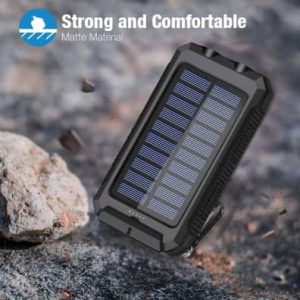
  1. Solar Charging Capability – The primary feature of this charger is its ability to harness solar energy to recharge its internal battery. This makes it an excellent choice for those who spend time camping, hiking, or in emergency situations where conventional power sources are unavailable.
  2. High-Capacity Battery – The charger comes equipped with a high-capacity lithium-ion battery, often ranging from 10,000mAh to 30,000mAh, depending on the model. This allows multiple phone charges on a single full charge.
  3. Multiple Charging Ports – The device features multiple USB ports, enabling users to charge more than one device simultaneously. Some models also include USB-C and micro-USB input/output options.
  4. Rugged and Waterproof Design – The charger is built to withstand harsh conditions. It is often encased in a durable, waterproof, and shockproof shell, making it ideal for outdoor use.
  5. LED Flashlight and SOS Function – A built-in LED flashlight with different modes (steady, strobe, and SOS) makes it useful for emergencies and nighttime adventures.
  6. Fast Charging Technology – Some models support quick charge technology, ensuring faster power delivery to compatible devices.
  7. Wireless Charging – Certain advanced versions include a Qi wireless charging pad, allowing users to charge their phones without the need for cables.

    Why Choose an SOS Solar Phone Charger?

Pros

The SOS Solar Phone Charger offers several benefits that make it a valuable accessory:

  1. Eco-Friendly and Sustainable – Harnessing solar energy reduces dependence on conventional electricity, making it a green energy alternative.
  2. Ideal for Outdoor Adventures – Its robust design, water resistance, and built-in flashlight make it perfect for camping, hiking, and other outdoor activities.
  3. Reliable Emergency Power – In case of power outages, natural disasters, or travel mishaps, this charger ensures that your phone remains functional.
  4. Large Battery Capacity – The high-capacity battery provides multiple phone charges, making it useful for extended trips.
  5. Multi-Device Charging – The presence of multiple ports allows for charging multiple devices simultaneously, including smartphones, tablets, cameras, and more.
  6. Wireless Charging Option – Eliminates the need for cables, enhancing convenience.
  7. Portable and Lightweight – Despite its rugged build, it remains relatively lightweight and easy to carry.

Cons

While the SOS Solar Phone Charger has many advantages, it is not without its limitations:

  1. Slow Solar Charging – Solar charging can be slow, especially in low-light conditions. It is recommended to charge the battery fully before relying solely on solar power.
  2. Bulky Design – While portable, the charger can be bulkier than conventional power banks due to its rugged features.
  3. Limited Solar Panel Efficiency – The small built-in solar panels do not generate enough power to fully charge the device quickly, often requiring a full day under direct sunlight.
  4. Wireless Charging Can Be Slow – Compared to wired charging, wireless charging may take longer to charge a device.
  5. Not Always Airline-Friendly – Some airlines have restrictions on carrying high-capacity batteries in hand luggage.

Sos solar phone

Conclusion

The SOS Solar Phone Charger is an excellent investment for those who need a reliable power source in remote locations, during emergencies, or simply as an eco-friendly alternative to traditional charging methods. Its combination of solar charging, high battery capacity, and rugged design makes it a great choice for adventurers, travelers, and preparedness enthusiasts.

However, SOS Solar Phone Charger is important to acknowledge its limitations, such as slower solar charging and bulkiness, which may not make it ideal for everyday casual use. If you are looking for a portable power bank that functions well in outdoor environments and emergencies, the SOS Solar Phone Charger is a solid option. To maximize its potential, it is best to keep it fully charged before heading off on an adventure and use solar charging as a supplementary power source rather than the primary one.


amacg

Best 1 Cell Phone Signal Boosters for Verizon


In today’s world, staying connected is more important than ever. Whether you’re working remotely, traveling, or just trying to maintain strong cell reception at home, poor signal strength can be a major hassle. Cell phone signal boosters can significantly enhance your Verizon and AT&T reception by amplifying weak signals and providing more reliable coverage. In this review, we’ll cover top-rated signal boosters, their features, pros and cons, and conclude with recommendations to help you make an informed choice. 

Impact-Site-Verification: 5accaaa4-9ec5-47b6-b501-a5e3ceb94e20

Impact-Site-Verification: 5accaaa4-9ec5-47b6-b501-a5e3ceb94e20

Cell Phone Signal Boosters for Verizon: Enhancing Connectivity

Cell phone signal boosters are essential tools for improving mobile network reception, especially in areas with weak or unreliable signals. For Verizon customers, a signal booster can significantly enhance call quality, data speed, and overall connectivity.

How Do Signal Boosters Work?

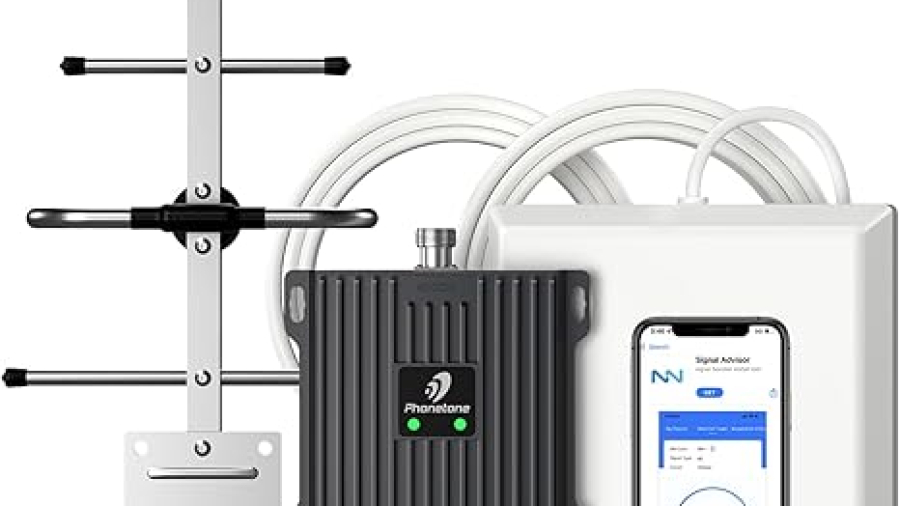
A cell phone signal booster works by amplifying the existing signal from Verizon’s network. It consists of three main components:

  1. External Antenna: Captures weak signals from nearby Verizon towers.

  2. Signal Booster: Amplifies the captured signal.

  3. Internal Antenna: Distributes the amplified signal inside your home, office, or vehicle.

By improving weak signal strength, these devices ensure that users can make clearer calls, stream videos, and use data without interruption.

Benefits of a Verizon Signal Booster

  1. Improved Call Quality: Reduces dropped calls and enhances voice clarity.

  2. Faster Data Speeds: Boosts LTE and 5G speeds for smoother browsing, streaming, and downloading.

  3. Enhanced Coverage: Provides reliable connectivity in hard-to-reach areas like basements, rural zones, and buildings with thick walls.

Types of Boosters

  1. Home Boosters: Ideal for residential use, covering specific areas like rooms or entire homes.

  2. Car Boosters: Designed for use inside vehicles, ensuring strong signal while on the go.

  3. Commercial Boosters: Used for businesses or large buildings, enhancing coverage in larger spaces.

Choosing the Right Booster for Verizon

When selecting a signal booster for Verizon, ensure the device supports the carrier’s frequencies, such as LTE bands and 5G bands. Popular models include the we Boost Home Multiroom and Sure Call Fusion4Home, both of which are Verizon-compatible.


BUY ON AMAZON


1. we Boost Home Multiroom -Cell Phone

Features:

  • Coverage Area: Up to 5,000 sq. ft.
  • Frequency Bands: Supports Verizon and AT&T’s bands (700 MHz, 850 MHz, 1900 MHz, etc.)
  • Powerful Amplification: Increases signal strength by up to 32x.
  • Easy Installation: Comes with all necessary components and clear instructions.
  • Automatic Gain Control (AGC): Adjusts signal strength for optimal performance.
  • Network Compatibility: Works with all major carriers including Verizon and AT&T.

Pros:

  • Excellent for large homes or offices.
  • Improves voice, text, and 4G LTE data speeds.
  • Durable and well-built.
  • Minimal signal interference.

Cons:

  • Higher price point compared to some competitors.
  • Requires proper antenna placement for best results.

2. SureCall Fusion4Home – Cell Phone

Features: Cell Phone

  • Coverage Area: Up to 3,000 sq. ft.
  • Frequency Bands: Covers Verizon and AT&T bands (700 MHz, 850 MHz, 1900 MHz).
  • 5-Band Technology: Supports multiple devices without losing quality.
  • User-Friendly Setup: Plug-and-play installation process.
  • Reliable Performance: Reduces dropped calls and improves data speeds.

Pros:

  • Affordable and budget-friendly.
  • Works well in suburban and rural areas.
  • Enhances both voice and data reception effectively.
  • Sleek, unobtrusive design.

Cell Phone

Cons:

  • Smaller coverage area might not be suitable for larger homes.
  • May require occasional adjustment of outdoor antenna.

3. HiBoost Home 4K Smart Link

Features:

  • Coverage Area: Up to 4,000 sq. ft.
  • Frequency Bands: Compatible with Verizon and AT&T’s major frequency bands.
  • Smart Link Technology: Real-time performance monitoring via mobile app.
  • High-Gain Antennas: Strong signal reception and transmission.
  • Easy Installation: Includes all necessary components and support.

Pros:

  • Smart app for easy signal monitoring and adjustments.
  • Consistent and reliable performance.
  • Supports multiple users simultaneously.
  • Excellent customer support.

Cons:

  • Slightly more expensive than entry-level boosters.
  • Setup may take longer for users unfamiliar with signal equipment.

Conclusion

Choosing the right cell phone signal booster for Verizon and AT&T depends on your specific needs and budget. For large spaces, the we Boost Home Multiroom is unmatched in coverage and performance. If you’re looking for a budget-friendly option without compromising much on quality, the SureCall Fusion4Home is an excellent choice. Meanwhile, the HiBoost Home 4K Smart Link offers advanced features like smart monitoring, making it ideal for tech-savvy users who want real-time performance insights.

Investing in a quality signal booster can vastly improve your cell phone experience, reducing dropped calls and boosting data speeds. Whether you choose we Boost, Sure Call, or HI Boost, you’ll enjoy stronger, more reliable Verizon and AT&T reception throughout your home or office.